
MTT Sessions
The Sessions page gives you a history of your tournament activity grouped into sessions. It is designed for reviewing results over a period of time rather than entering tournaments while you play.
A session groups the tournaments played during a continuous period and summarizes the buy-ins, returns, and net result for that session.
Daily and Historical Views
Open MTT Tracker → Sessions to view your session history.
Use the Site selector and date controls to narrow the sessions shown. You can use preset ranges such as MTD, 30d, 90d, 1y, and YTD, or enter a custom date range.
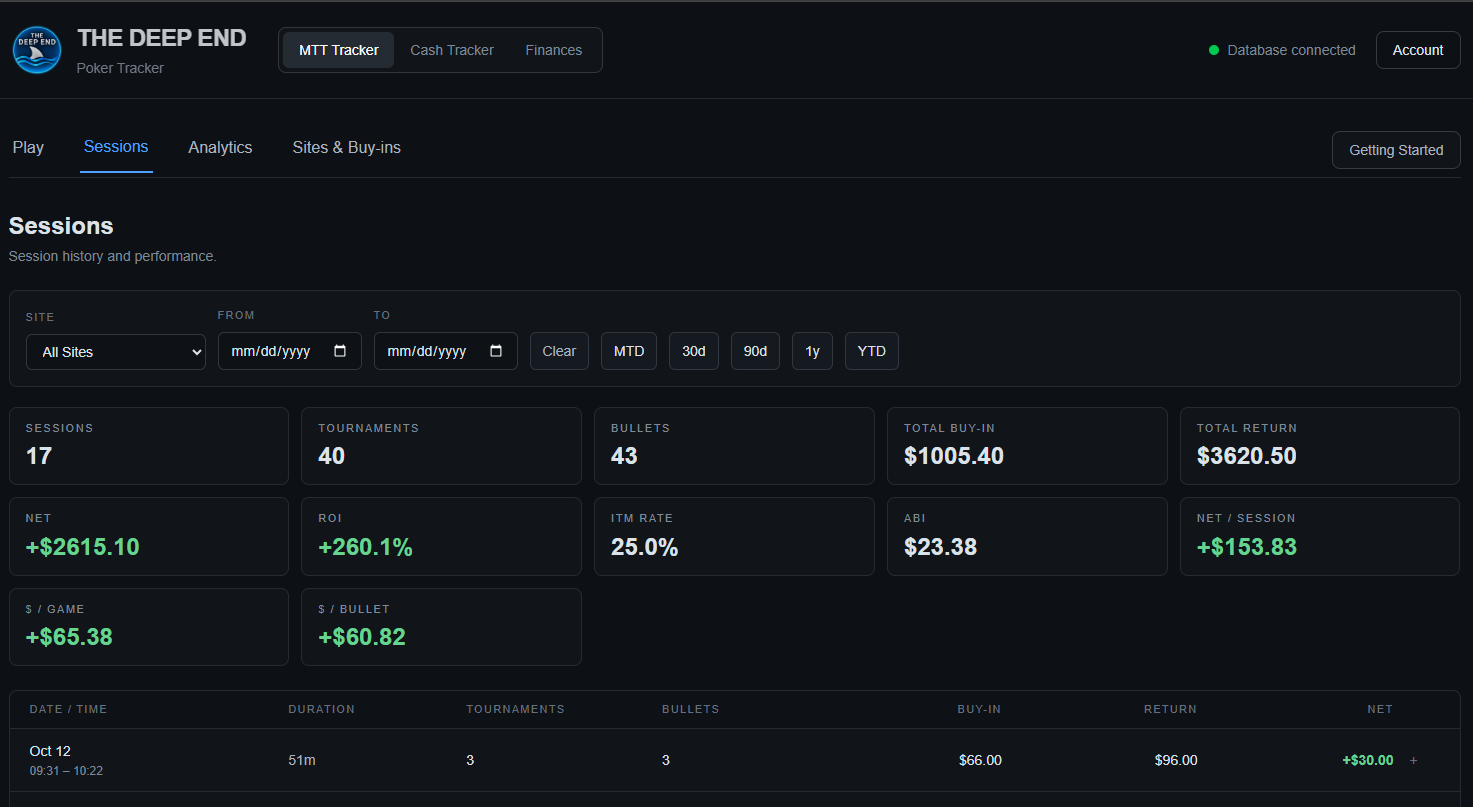
Each session appears as a row showing its date and time, duration, number of tournaments, bullets, buy-in, return, and net result.
Active sessions are identified in the session list as still active.
Session Details
Select the + at the right side of a session to expand it.
The expanded view shows the individual tournaments that make up that session, including the site, format, buy-in, bullets, total in, cashes, bounties, and net result.
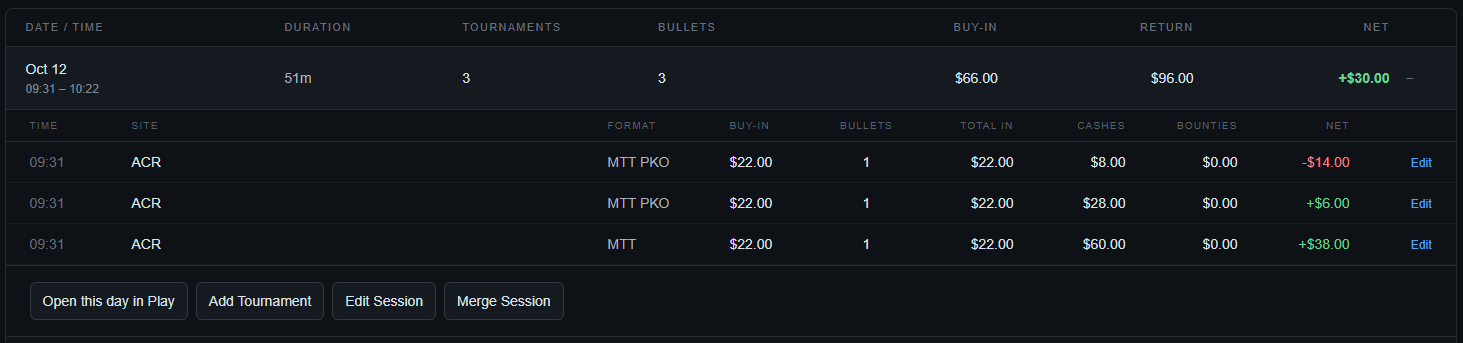
This is useful when you want to see which individual tournaments make up a session's result.
KPIs
The KPI cards at the top summarize the sessions included by the current filters.
They include:
- Sessions — number of sessions.
- Tournaments — total tournaments played.
- Bullets — total tournament bullets.
- Total Buy-in — total amount entered across the included tournaments.
- Total Return — total tournament returns.
- Net — total return minus total buy-in.
- ROI — net profit relative to total buy-in.
- ITM Rate — percentage of tournaments that recorded a cash.
- ABI — average buy-in per tournament.
- Net / Session — average net result per session.
- $ / Game — average net result per tournament.
- $ / Bullet — average net result per bullet.

The KPI values change when you change the Site or date filters, so make sure the selected period represents the results you want to review.
Understanding the Totals
The session-level totals are calculated from the tournaments contained in the included sessions.
Total Buy-in reflects the money entered across the included tournaments, while Total Return reflects the money returned.
Net is the difference between Total Return and Total Buy-in.
The percentage and average KPIs are calculated from the same filtered set of results. Changing the date range or site filter can therefore change both the dollar totals and metrics such as ROI, ITM Rate, ABI, and Net / Session.
Session Actions
When a session is expanded, several actions are available:
- Open this day in Play — opens that date in the Play view so you can review the tournament entries for that day.
- Add Tournament — adds another tournament to the selected session.
- Edit Session — edits the session's session-level details.
- Merge Session — combines the selected session with another session when appropriate.
Individual tournaments within an expanded session also have an Edit control for making changes to a specific tournament.
When to Use Sessions
Use Play when you are actively logging tournaments.
Use Sessions when you want to review the resulting history:
- Choose the site or date range you want to examine.
- Review the KPI totals.
- Expand individual sessions when you need to see the tournaments behind the numbers.
- Use the available session actions when a historical session needs to be changed or additional tournament data needs to be added.
Tip: Sessions is the best place to review your tournament results at the session level. Use Analytics when you want to study those results using more detailed performance filters.